Low Range Offroad 4x4 Getting Started
Finish your first trail without rushing — read the ground, set up the truck, and manage fuel on Roblox.
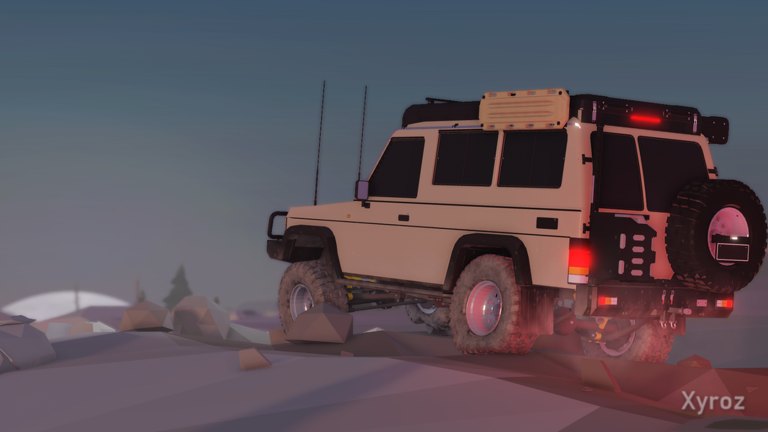
Low Range: Offroad 4x4 on Roblox is a slow, technical trail game from MTBAce Studios. Each stage is one path from start to finish, inspired by real offroad tracks. If you treat it like a speed race, you will dig ruts, burn fuel, and winch more than you drive. This getting started guide walks you through the first hour: joining the experience, learning to stop on purpose, picking a line, using basic truck setup, recovering with the winch, and planning around fuel caches.
Bookmark the Guides Hub after this page. You will want Controls, Truck Setup, Winch Guide, and Fuel and Checkpoints open as the trail gets harder. The game is Early Access — things change and some systems break — so treat in-game prompts as the final word when they disagree with an older clip.
What you are trying to do
Your job on every stage is simple to say and hard to execute: get the truck from the start line to the finish without stranding yourself. Speed will not get you through. Reading the ground and setting up your truck will. Surfaces named by the developer — mud, roots, rock, and water — all change how the truck grips and climbs. Mud ruts deepen for everyone on the server as trucks pass. Fuel caches refill your tank and act as checkpoints. You can play solo or with friends on servers sized for up to 20 players. Keyboard, mouse, and controller are supported.
First session checklist
- Launch the official Roblox place and pick an input you can use for several minutes without fighting the camera.
- On easy ground, drive a short distance, stop where you choose, turn gently, and reverse. If you cannot reverse on command, fix that before the first hill. Community guides commonly start the engine with R — confirm the prompt in your build.
- Learn the gear modes you will actually use: Reverse, Neutral, Automatic, L, and L+. Reverse is a mode, not “hold brake and hope.” Low range modes exist so you can crawl ledges without launching the front tires.
- Glance at fuel before you leave the start area. You do not start with an endless tank, and hard driving spends it faster.
- Spot the first fuel cache idea early: caches are both refills and checkpoints. Plan the stretch between them like a real trail day.
When those five habits feel boring, you are ready for real obstacles. Boring is good. Panic throttle is how ruts get deeper for the whole server.
How to pick a line
A line is the path you want your tires to take, including the exit. Look past the first bump. If the straightest route drops into a polished mud trench or aims the rear axle into a root, search for a shallower entry while you still have room to reposition.
Mud
Do not only stare at the route — stare at the ruts. Traffic deepens mud for everyone. A crossing that worked for the truck ahead of you may be a trap by the time you arrive. Prefer a shallower shoulder inside the trail when one exists. If the wheels spin and the truck barely moves, ease off. Back out if you can and change the entry angle before dumping more throttle into the same hole.
Rock
Plan the whole rock garden, including where the tires come back down. Getting the front tires over the first ledge while the rear is twisted sideways is a classic fail. Approach slowly in low range so you can see climb versus slip. If the line is wrong, reverse to easy ground instead of yanking the wheel halfway across.
Roots
A single root can stop a climb that looked smooth. Aim the tires at the smaller step before you reach it, then keep watching until the rear clears too. On multi-root stretches, leave room to straighten between hits.
Water
Pick an exit bank before you enter. A route that ends on a steep lip is harder than one that ends on a gentle climb, even if the water looks the same. Steady throttle beats a panicked splash. Official copy confirms water changes grip; it does not publish a safe depth for every truck.
Setup before the hard section
When the trail gets serious, the developer points at three tools: air down the tires, lock the diffs, and drop into low range. Community beginner videos widely report 4 for tire pressure (watch the bottom-left indicator and stop at the mud mark), K for differential lockers, and gear modes L / L+ for crawl control. Full detail lives on Truck Setup — change one setting at a time on practice ground so you learn what each control actually does.
4WD helps traction and burns more fuel. That tradeoff is explained on Fuel and Checkpoints. On easy dirt you may not need every locker and every low-range click. On a soft climb into a ledge, grip is often worth the burn — if you still have cache range left.
When you get stuck
First ask whether the truck can roll back onto firmer ground. If yes, reverse out and change the line. If not, look for a winch anchor in the direction you need to travel. Trees and friends’ trucks are the anchors the developer calls out. Choose a pull that lands you on steerable ground, not deeper into the same rut. After the pull, stop and diagnose. The Winch Guide covers anchor choice and group etiquette when several trucks share a bottleneck.
Solo versus friends
Solo runs are fully valid. Before a no-backup hole, mark a tree you can winch to. In a group, let the lead truck clear or reverse before you enter the same pinch. Watching where its tires slip is free scouting. Leave space so a failed attempt can back out without stacking three trucks in one rut — remember those ruts deepen for the whole server.
What to practice on run two
After your first finish (or first honest DNF), rerun the same stage with a quieter throttle foot. Practice stopping short of obstacles, selecting L earlier, and airing down before mud instead of after you are already buried. Confirm every binding on Controls. Then push into deliberate setup experiments on Truck Setup.
Common first-hour mistakes
- Holding full throttle in Automatic through mud “to keep momentum,” which digs a trench for you and everyone else.
- Climbing a ledge without low range, then spinning when the front tires crest and the rear loses bite.
- Ignoring fuel until the tank is empty between caches.
- Winching straight back into the rut that trapped you.
- Copying another driver’s line without checking whether the mud has already deepened.
Next pages on this wiki
Return to the Guides Hub anytime you need the full directory. For input specifics, open Controls. For tire pressure, lockers, and low range decision trees, open Truck Setup. For recovery, open Winch Guide. For cache planning and 4WD burn, open Fuel and Checkpoints.
Finish one clean trail. Then chase time. Low Range Offroad 4x4 rewards patience more than panic — that is the whole point of the Early Access fantasy MTBAce Studios is shipping on Roblox.
Frequently Asked Questions
Quick answers for Low Range Offroad 4x4 players.
Can I play Low Range: Offroad 4x4 solo on Roblox?
Yes. Solo and friends play are both supported. On solo runs, spot a tree for winch recovery before entering sections with no easy reverse path.
Why did I get stuck where my friend just crossed?
Mud ruts deepen with every truck on the server. The same line can be worse by the time you arrive. Look for a shallower entry or wait for a different approach.
What should I learn before the first hard climb?
Reliable stop and reverse, gear modes including L and L+, and the three setup tools: tire pressure, diff locks, and low range. See Controls and Truck Setup.
Do fuel caches do more than refill the tank?
Yes. The developer describes trail fuel caches as refills and checkpoints. Use them to reassess setup and plan the next stretch.
Is this getting started guide still accurate in Early Access?
Core ideas — line choice, setup, winch anchors, fuel caches, shared mud — match the official Roblox description. Bindings can shift; confirm keys in your current build.
Where do I go after finishing this page?
Read Controls next, then Truck Setup. Keep Winch Guide and Fuel and Checkpoints ready for the first recovery and the first long stretch between caches.